Umo Mobility
- 4.5
- Rating
- 500.00K
- Installs
- Free
- Price

 Analysis by App-foxy
When I test a travel app, I pay attention to more than whether it opens quickly or looks tidy. A mobility tool may sit on my phone during ordinary commutes, unfamiliar trips, and moments when I am already in a hurry, so I want to understand what it helps me do, what choices I can control, and where I should slow down before relying on it. That is the lens I used with Umo Mobility, a free Travel & Local app from Delerrok.
My overall impression is practical rather than flashy. Umo is aimed at people who use public transportation and want a companion for the journey, but its value depends heavily on the local transit service connected to it. That is the first point I would make to a friend: it is not automatically a universal replacement for every transport app. It makes the most sense when your local operator supports the Umo system and the functions you need are available in your area.
The app has built a substantial audience, with more than half a million installs and an average rating of 4.4 from around 4.8 thousand ratings. Those figures suggest that many riders find it useful, while also reminding me not to treat a strong store score as proof that every city or route will work equally well. Public transport experiences are local by nature. A smooth trip in one network does not guarantee the same experience elsewhere.
You May Also Like

 Blood Strike: 2.5 Anniversary
Blood Strike’s Loadouts Turn Every Drop Into a Tactical Gamble
A close look at Blood Strike’s custom loadouts: how fast access to signature weapons reshapes its battle royale rhythm, rewards preparation, and narrows the gap between fights.

 Pandora - Music & Podcasts
Pandora’s Music Is Easy to Start, but Harder to Recover
Pandora’s strength is its low-effort path from a seed to a station. Its weak spot is how much confidence it asks you to place in connection, setup, and quiet recovery.

 8 Ball Pool
 Is Built on Rivalries, Rematches, and Routine
A close look at the rivalries, rematches, shared routines, and unanswered safety questions that turn a quick pool match into a persistent mobile community.

 Samsung Music
’s Quiet Strength Is Playing What You Already Own
Its reach comes less from spectacle than from dependable access to a personal library. That simplicity is both the app’s strongest retention engine and its ceiling.

 AccuWeather: Weather Radar
AccuWeather Review: A Quick, Clear Forecast for Everyday Decisions
For everyday plans, the best forecast is the one you can understand quickly. AccuWeather makes rain timing, radar, and local conditions easy to act on, with a few trade-offs.

 Hill Climb Racing
Why Hill Climb Racing Still Turns Crashes Into One More Run
A tiny car, a bumpy hill and one more upgrade: Hill Climb Racing keeps resurfacing because its simple chaos makes every near-miss feel personal.
More From Our News Desk



Where Umo fits into a real travel routine
I find the app easiest to understand as a bridge between planning and riding. Instead of treating a bus or other local service as an isolated part of a journey, Umo is designed to sit alongside the practical decisions a passenger makes: checking what is available, preparing for payment or access where supported, and keeping travel information in one place. That can be more convenient than switching between a general maps app, a transit operator website, and a separate ticketing tool.
A realistic example is a weekday trip to an unfamiliar appointment. I would check the available service before leaving, make sure my phone is ready, and use the app as a reference rather than waiting until I was already standing at the stop. This small change matters. When a journey involves a transfer, a short walking connection, or a payment step, preparing beforehand reduces the chance of fumbling with several apps in public.
That does not mean Umo should be your only source of truth. I would still look at the actual stop, route direction, and departure context before boarding. Transit information can change, and a phone screen cannot replace paying attention to platform signs or announcements. The app is most helpful when it supports good travel habits rather than encouraging me to follow it blindly.
The basic audience is clear: regular riders, occasional passengers in a participating network, students, workers, and visitors who prefer a dedicated mobility app over a general-purpose map. It may also suit someone who wants to keep travel-related actions separate from personal banking or unrelated shopping apps. On the other hand, a person who only drives, cycles, or uses taxis is unlikely to gain much from installing it.
Why the developer and app history matter to my trust assessment
Delerrok is the listed developer, and the app was released on January 20, 2021. That gives Umo enough history to be more than a brand-new experiment, but age alone does not establish that every part of the experience is dependable. I judge it by the clarity of its choices and by whether it behaves predictably when I am handling a journey.
The current version is 6.8.2.2181, and the app supports Android 7.0 and later. For someone using an older phone, that minimum requirement is worth checking before planning around it. A travel tool is not useful if it cannot run on the device I carry every day, especially when I need it away from home.
The Everyone content rating is reassuring in a narrow sense: the app is positioned for a broad audience rather than a mature-only one. Still, an age label does not answer the privacy questions I care about. It does not tell me how comfortable I should be with account creation, location-related choices, payment information, or notifications. Those decisions deserve attention inside the app and in its permission prompts.
Controls I look for before adding a mobility app
My first check is whether Umo asks for access that is clearly connected to the task I am trying to complete. If a feature needs location, I want the request to make sense in context. If I am only browsing information before leaving home, I prefer not to grant more access than necessary. I do not assume a permission is harmless simply because the app belongs to the travel category.
I also look at the account flow. A useful mobility service may need an account for certain functions, but I want the app to make the difference between browsing and signing in understandable. If I can inspect relevant service information before committing personal details, that is a better experience. If an account is required for a particular action, I want that requirement to appear before I spend time setting everything up.
Payment is another moment where I slow down. If Umo is being used for a fare or another transaction supported by the local network, I would verify the recipient, the amount, and the selected payment method before confirming. I would not treat a saved payment option as a reason to skip the final review. Convenience is valuable, but a quick tap can be difficult to undo once a transaction is complete.
My practical rule is simple: use the least access and the fewest saved details needed for the journey. That is not an accusation against Umo; it is a sensible habit for any app that may connect travel activity with an account or payment method. I would revisit those choices after an update, because a new version can change screens, defaults, or the way a feature is presented.
Data-sensitive moments happen during normal travel
The most sensitive part of using a mobility app is often not installation. It is the ordinary sequence that follows: opening the app near a stop, entering an account, checking a trip, paying a fare, or showing something on the phone while other people are nearby. I prefer to review these moments calmly at home instead of making decisions while boarding.
For example, if I were preparing for an early appointment, I would set up the app before leaving, check whether I needed to sign in, and confirm that my phone could display the relevant travel information. I would avoid experimenting with account settings in a crowded vehicle. This workflow gives me more time to read prompts and makes it easier to notice whether a choice is optional or required.
Location deserves particular care. A mobility app can be useful without my treating continuous access as automatically necessary. I would read the wording of the permission request and choose the narrowest setting that still supports the function I want. If a feature works with manual route or stop selection, that may be preferable for a rider who wants tighter control over location sharing.
Notifications can also affect privacy and attention. Travel alerts may be useful, but I would decide whether they should appear on a locked screen where another person could see them. On a shared or borrowed device, I would be especially careful about account persistence and visible trip details. These are small settings, yet they shape how much information is exposed during everyday use.
What user agency looks like in practice
I value apps that let me make deliberate choices instead of pushing me through a single path. With Umo, I would look for clear ways to review account details, notification preferences, location access, and any payment-related settings available to me. I would also check whether I can sign out when using a shared phone or when I no longer want the account active on that device.
That control matters for families and occasional travelers. A parent may want to help a child prepare a trip without leaving a payment method permanently available. A visitor may use the service for a short stay and then want to remove stored details afterward. A regular commuter may prefer convenience, but should still know how to inspect or change the choices made during setup.
One useful habit is to separate preparation from execution. I would explore the app, read its prompts, and make account decisions before I am standing at the vehicle door. Then, during the journey, I would use only the information or action I actually need. This reduces accidental taps and makes it easier to notice when the app is asking for something unrelated to the immediate trip.
I would also keep a backup plan. A transit app can be unavailable because of a weak signal, a low battery, or a service-side problem. Carrying the route name, stop information, or another offline reference can prevent a minor technical issue from becoming a missed appointment. Umo can be the main tool in my routine, but I would not make it the sole thing keeping a time-sensitive journey together.
Where Umo is stronger than the usual alternatives
Compared with a general maps app, a dedicated mobility tool can feel more focused. Maps are excellent for combining walking, driving, cycling, and public transport, but they may send me through several screens before I reach a transit-specific action. Umo is more appealing when I want a transport-centered experience connected to a participating service rather than a broad map of everything around me.
Compared with a transit operator’s website, a mobile app is more convenient for repeated use. I do not have to open a browser and search for the right local page every time. The trade-off is that a dedicated app introduces another account, another set of permissions, and another place where I need to manage personal choices. For an occasional visitor, the website or a general map may be simpler if it provides all the needed information without setup.
Compared with paper tickets or a purely physical payment method, a phone-based workflow can reduce what I carry. It can also create new points of failure: battery life, screen access, login problems, or a payment setting that needs attention. I would choose Umo for convenience, not because digital travel is automatically more reliable in every situation.
The most non-obvious trade-off is that centralizing travel tasks can make the journey feel easier while making account hygiene more important. If I use one app repeatedly, I should know what remains signed in, which notifications appear, and whether old payment or profile details are still stored. The convenience is real, but it should be matched with occasional housekeeping.
Who should install it, and who should choose something else?
I would recommend trying Umo to someone whose local transit network supports it and who wants a dedicated companion for regular rides. It is particularly sensible for a commuter who repeats similar journeys, a visitor who needs help navigating an unfamiliar service, or a rider who prefers keeping transit actions together rather than relying on several unrelated tools.
I would be more cautious with someone who expects one app to cover every city. Umo is not automatically the best choice for a traveler moving between regions with different transport systems. In that situation, a general maps app or the official app for each local operator may offer broader coverage, even if the experience is less consistent.
I would also suggest skipping it if the required account or permission choices do not fit your comfort level. A free price removes the purchase barrier, but it does not remove the need to decide what information to share or what access to allow. If you only take public transport once in a long while, the setup effort may not be worth it unless Umo provides a specific function you need.
My cautious verdict after using it as a travel companion
Umo Mobility is a credible option for riders who are connected to its supported transit ecosystem and want a focused way to handle everyday mobility. I like its practical role: it can sit between trip preparation and the actual ride, helping me avoid the disorder of juggling a browser, a map, and separate travel steps.
My recommendation comes with a condition. I would install it only after checking that it serves my local network, and I would review permissions, account requirements, notifications, and payment choices before relying on it. Those checks are not obstacles; they are part of using a travel app responsibly.
The app is free, carries an Everyone rating, and comes from Delerrok with an established release history. Its 4.4 average and broad install base make it worth considering, but neither should replace my own test of local coverage and personal comfort. In my experience, the best reason to choose Umo is not the promise of a universal solution. It is the possibility of having a more organized, transit-specific routine when the service matches the places I actually travel.
If that match exists, I would give it a fair trial before a busy week, adjust the privacy and notification choices that matter to me, and keep a simple backup for important journeys. Used that way, Umo feels like a useful assistant rather than something I have to trust blindly.
FAQs for Umo Mobility
01What is Umo Mobility and how does it work?
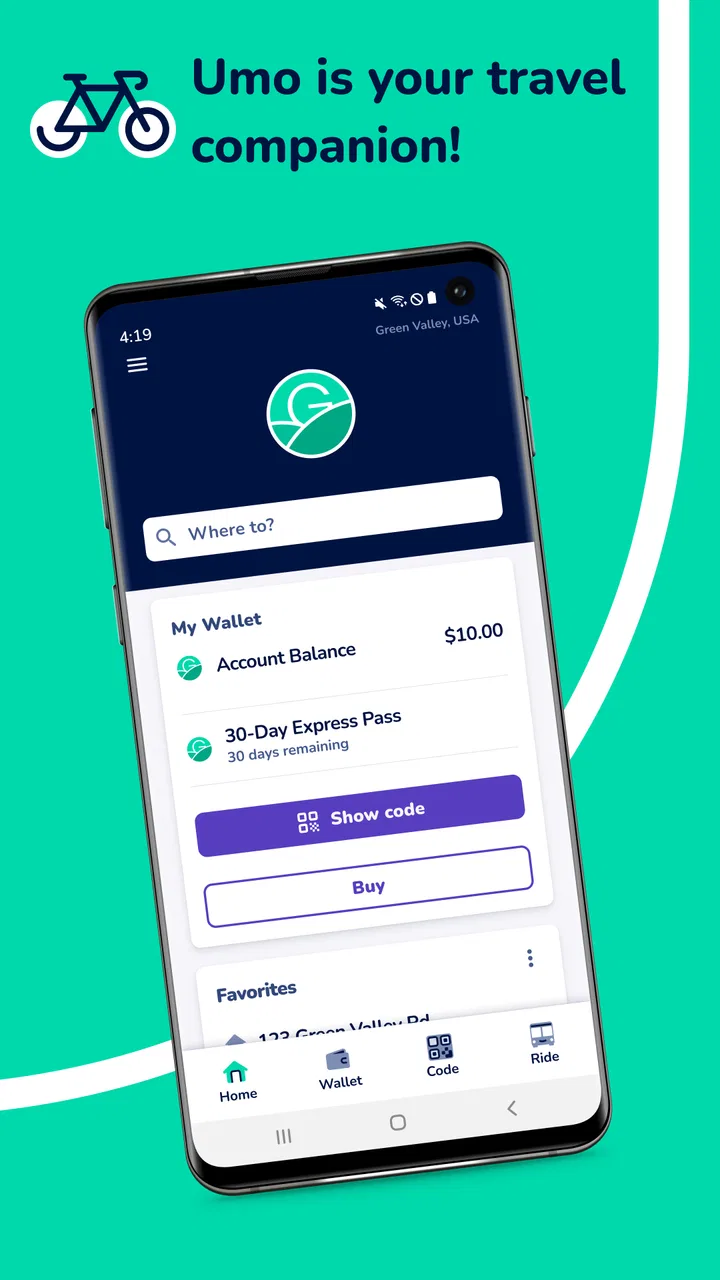
Umo Mobility is a comprehensive app designed to simplify urban transportation by integrating various transit options like buses, trains, and bikes into one platform. Users can plan their routes, track real-time transit schedules, and even pay for their trips directly through the app, making commuting more efficient and convenient.
02Is Umo Mobility available in my city?
Umo Mobility is continually expanding its service coverage. To check if it’s available in your city, visit the app’s website or download the app and enter your location. The app provides a list of supported cities and regions where its transit features are fully functional.
03Are there any costs associated with using Umo Mobility?
Downloading Umo Mobility is free, but certain features, like purchasing transit tickets or passes, may incur charges. Prices vary based on your location and the transit services you choose. The app provides a clear breakdown of costs before any purchase, ensuring transparency and no hidden fees.
04How secure is my payment information with Umo Mobility?
Umo Mobility prioritizes user security by employing advanced encryption and secure payment gateways. Users can store their payment details safely and make transactions with confidence. The app also follows strict privacy policies to protect user data from unauthorized access.
05Can I use Umo Mobility without an internet connection?
Some features of Umo Mobility, such as offline maps and saved routes, can be accessed without an internet connection. However, real-time updates and ticket purchases require connectivity. The app is designed to minimize data usage while providing essential offline functionalities to assist users on the go.
Pros
- Intuitive user interface for easy navigation.
- Comprehensive route planning options.
- Real-time updates on transit schedules.
- Supports multiple transportation modes.
- Customizable alerts and notifications.
Cons
- Limited offline access for route planning.
- Occasional inaccuracies in transit timings.
- May consume significant battery power.
- Requires stable internet connection.
- Limited support for rural areas.

Umo Mobility
Gallery